
Switch Conversation Models: Pick DeepSeek or GPT on the Creation/Marketing Home, and Your Agent Follows Your Preference
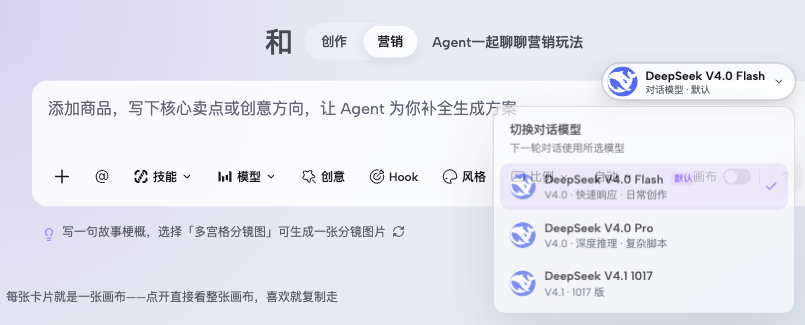
See the current conversation model (DeepSeek or GPT brand mark + name) in the top-right of the input box. Click to open a menu, choose a model, and your selection is saved and automatically applied to Agent runs, including on the canvas.
Start with a familiar bottleneck
When using the Zhishiyun Agent for creation or marketing content, you may want to use different conversation models for different tasks—for example, a faster model for everyday quick creation and a stronger reasoning model for complex scripts or long documents. Without an easy switch, you are stuck with the default model or must dig into settings, disrupting your workflow and leaving you unsure which model is actually in use.
Keep the workflow on one canvas
Zhishiyun adds a conversation model switcher capsule in the top-right of the input box on the creation/marketing home and chat page. It shows the current model (DeepSeek or GPT brand mark + name + hint). Clicking it opens a menu listing available DeepSeek V4.0 Flash (default), V4.0 Pro, V4.1 1017, and GPT-6 Astra (if OpenRouter key is configured). Your choice is persisted and sent with each Agent run; multiple instances on the same page sync. Canvas Agent also follows your conversation model preference, while the media model for generation remains controlled by the canvas 'Model' pill, keeping the two semantics independent.
Consistent model selection across home and chat
On the creation or marketing home, the input box's top-right shows a capsule like 'DeepSeek V4.0 Flash · Conversation Model · Default'. Clicking it opens a 'Switch Conversation Model' menu listing all available models, with the current one checked.
Your selection is saved via a shared preference service. When you enter the chat page, the input box reads the same preference and sends it with each Agent run. This means the home and chat are not two separate states—you don't need to set it again.
Canvas Agent follows conversation model, media model stays independent
Canvas Agent reads your saved conversation model preference and sends it as the run's model parameter, so Agent conversations on the canvas also use your chosen model.
Meanwhile, the media model used for generating images or videos remains controlled by the canvas 'Model' pill. This lets you use a faster conversation model for reasoning while using a higher-quality media model for generation, without interference.
Available conversation models and brand marks
Built-in DeepSeek models include V4.0 Flash (default, fast response, for everyday creation), V4.0 Pro (deep reasoning, for complex scripts), and V4.1 1017 (1017 version). Each model has a positioning hint in the menu to help you choose.
If an OpenRouter API key is configured, GPT-6 Astra (flagship conversation, for complex reasoning and long text) also appears. The capsule shows DeepSeek or OpenAI brand marks, solely to identify the actual model source, not implying official partnership.
A simple way to begin
- Open the model switcher menu
On the creation or marketing home, click the current model capsule (e.g., 'DeepSeek V4.0 Flash') in the top-right of the input box to expand the 'Switch Conversation Model' menu.
- Choose your target model
In the menu, click the model you want, such as DeepSeek V4.0 Pro or GPT-6 Astra (if visible). The currently selected model is marked with a check.
- Confirm and continue
After selection, the menu closes and the input capsule updates to the new model. Your choice is saved, and subsequent Agent runs (including canvas Agent) will use that model—no need to set it again.