
Use Four Product Video References to Plan Your Visual Direction
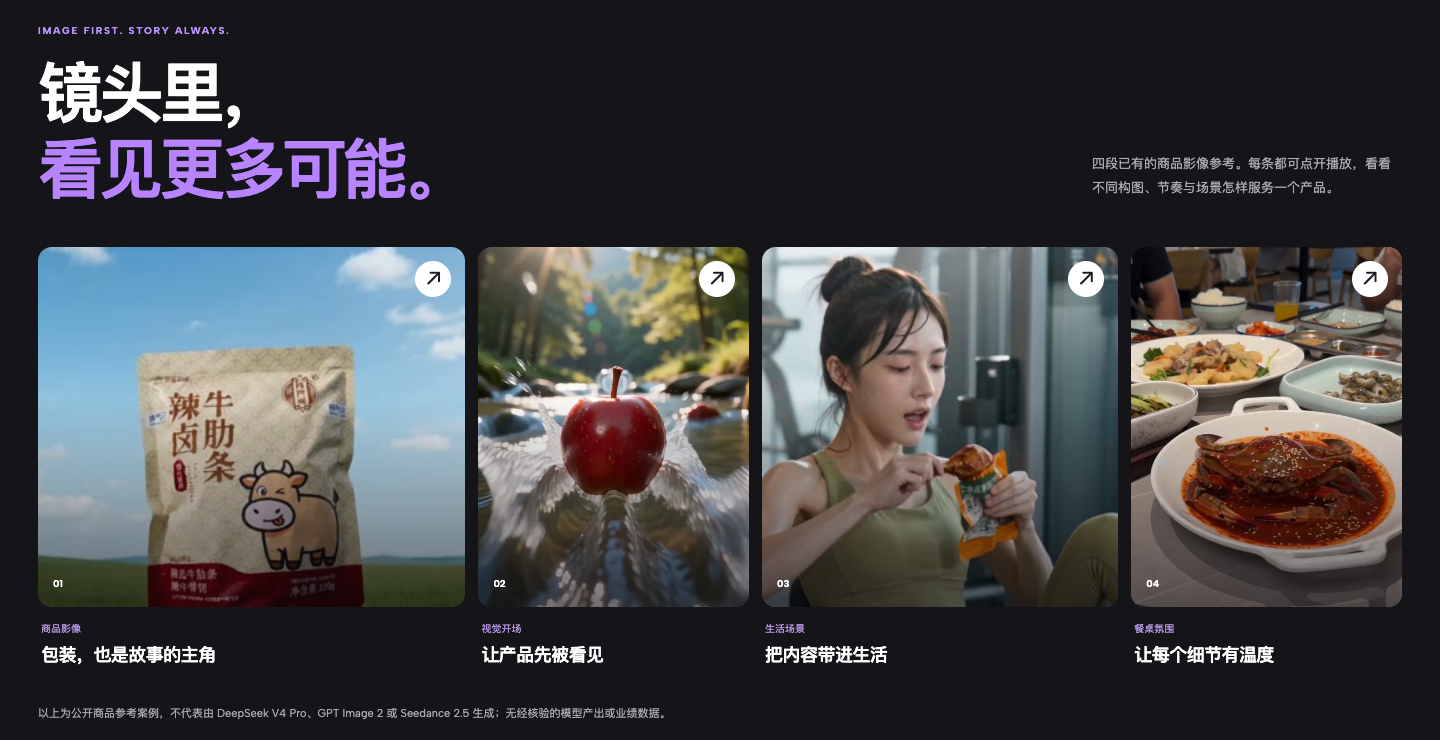
Have a product but no clear shot direction yet? Browse four public video references and use their different settings and compositions to shape your own visual brief.
Start with a familiar bottleneck
You know which product to feature, but “make it look good” is still too vague to guide a short video. The opening, setting, product framing, and pacing have not taken shape yet. A still poster alone also cannot show how a sequence feels in motion.
Keep the workflow on one canvas
Zhishiyun’s homepage offers four playable product video references. Browse the categories, open a video, and observe its framing, setting, and pacing. Turn the details that fit your idea into a creative brief, then take that brief to the workspace for your own project.
Start with one of four ways to frame a product
The homepage reference gallery presents four public examples under Product Imagery, Visual Opening, Everyday Scene, and Dining Atmosphere. Each label suggests a different lens for observation: how packaging enters the frame, how a product catches attention, how it appears in daily life, or how a table setting shapes the mood.
You do not need a complete script yet. Pick the example closest to your product, audience, or use case and see whether it suggests a visual direction worth exploring.
Play a reference to study motion, not just the cover
Select any case card to open a video player with playback controls. As you watch, note where the product sits in the frame, how foreground and background relate, which setting is used, and how the shots move. Keep the details that help communicate the product.
These are prompts for your own observation, not an automated analysis provided by the page. Pause or replay the video, then describe in your own words what you like about its presentation.
Turn observations into a brief for your own video
Break useful ideas into specific notes such as the opening shot, a product close-up, a use setting, the color mood, or the rhythm of a transition. Combine them with your own brand facts and assets, remove anything that does not fit, and define a clear shot objective.
The reference gallery provides videos to watch; it does not fill in a prompt or generate a video for you. Once your direction is clear, use the homepage entry point to continue in the workspace.
A simple way to begin
- Open the Zhishiyun homepage
Choose “Image References” from the homepage navigation.
- Pick a relevant example
Start with Product Imagery, Visual Opening, Everyday Scene, or Dining Atmosphere.
- Open and play the video
Select a case card, then observe its composition, setting, and pacing.
- Write your own shot brief
Note the visual cues you want to explore, adapt them to your product, and continue from the homepage into the workspace.